axiosaxios
一、json-server
1.1 作用
快速搭建一个API服务
1.2 使用
1.2.1 安装
npm i -g json-server
1.2.2 创建文件
创建一个 db.json 写入模拟数据
{
  "posts": [  // 第一个API http://localhost:3000/posts
    {
      "id": 1,
      "title": "json-server",
      "author": "typicode"
    }
  ],
  "comments": [  // 第二个API http://localhost:3000/comments
    {
      "id": 1,
      "body": "some comment",
      "postId": 1
    },
  ],
  "profile": {  // 第三个API http://localhost:3000/profile
    "name": "typicode"
  }
}
1.2.3 启动服务
json-server --watch db.json
必须在db.json目录下启动服务
在使用接口时服务不能停止
二、axios 介绍
Axios 是一个基于 promise 的 HTTP 库,可以用在浏览器和 Node.js 中
2.1 axios 的理解和使用
- 前端最流行的 ajax 请求库
- react/vue 官方都推荐使用 axios 发 ajax 请求
- 文档: https://github.com/axios/axios
- 中文网:https://www.axios-http.cn/docs/intro
2.2. axios 特点
- 基于 xhr + promise 的异步 ajax 请求库
- 返回的是一个promise对象
- 浏览器端/node 端都可以使用
- 支持请求/响应拦截器
- 支持请求取消
- 请求/响应数据转换
- 批量发送多个请求
三、axios使用
3.1 axios安装
npm i axios(在项目中使用)
BootCDN引入(学习使用)
3.2 axios 配置
BootCND引入 axios
<script src="https://cdn.bootcdn.net/ajax/libs/axios/1.5.0/axios.min.js"></script>3.3 axios基本使用
axios(config): 通用/最本质的发任意类型请求的方式
axios(url[, config]): 可以只指定 url 发 get 请求
<script src="https://cdn.bootcdn.net/ajax/libs/axios/1.5.0/axios.min.js"></script>;
// 获取第二篇文章
btns[0].onclick = function () {
  // 发送GET请求
  axios({
    // 请求类型
    method: "GET",
    // url
    url: "http://localhost:3000/posts/2",
    // 请求参数
  }).then((response) => {
    console.log(response);
  });
};

// 添加一篇新的文章
btns[1].onclick = function () {
  // 发送POST请求
  axios({
    // 请求类型
    method: "POST",
    // url
    url: "http://localhost:3000/posts",
    // 设置请求体
    data: {
      title: "我是新增内容",
      author: "yibu-xiaoxin",
    },
  }).then((response) => {
    console.log(response);
  });
};

// 更新数据第二篇文章的作者
btns[2].onclick = function () {
  // 发送PATCH请求
  axios({
    method: "PATCH",
    url: "http://localhost:3000/posts/2", // 最后跟的是id
    data: {
      author: "yibu-xiaoxin",
    },
  })
    .then((response) => {
      console.log(response);
    })
    .catch((err) => {
      console.log(err);
    });
};

// 删除第三篇文章
btns[3].onclick = function () {
  axios({
    method: "DELETE",
    url: "http://localhost:3000/posts/81a1",
  })
    .then((response) => {
      console.log(response);
    })
    .catch((err) => {
      console.log(err);
    });
};
3.4 axios 常用语法
axios.request(config): 等同于 axios(config)
axios.get(url[, config]): 发 get 请求 获取数据
axios.delete(url[, config]): 发 delete 请求 删除数据
axios.post(url[, data, config]): 发 post 请求 上传数据
axios.put(url[, data, config]): 发 put 请求 更新数据(覆盖)
axios.patch(url[, data, config]): 发 patch请求 更新数据(局部更新)
btns[1].onclick = function () {
  axios
    .post("http://localhost:3000/comments", {
      id: "3",
      content: "新加内容",
    })
    .then((response) => {
      console.log(response);
    });
};
3.5 axios 请求响应结果的结构
{
  config: 配置对象;
  data: 响应体/服务器返回的数据;
  headers: 响应头信息;
  request: 原生的AJAX对象;
  status: 响应状态码;
  statusText: 响应状态字符串;
}
3.6 axios配置对象
{
  url: 请求URL
  method: 请求类型
  baseURL: 设定URL的基础结构
  eg: baseURL:http://localhost:3000,在设置url时只设置path即可
  headers: 对请求头信息进行配置
  params: 设置url参数字符串 查询字符串
  eg:params:{
      id:12345
  }
  data: 请求体(会自动转换为JSON)/字符串
  timeout: 设置超时时间
}btns[0].onclick = function () {
axios({
url: "posts", // 由于设置了baseURL此处可以直接写path
method: "GET",
baseURL: "http://localhost:3000/", //设定URL的基础结构
params: {
id: 2, // 传递参数字符串id=2 与/posts?id=2相同
},
}).then((response) => {
console.log(response);
});
};3.7 axios 的默认配置
在项目中将重复的设置配置默认配置中,在后续的axios请求中将会自动添加
axios.defaults.xxx: 请求的默认全局配置
// 默认配置
axios.defaults.method = "GET"; // 设置默认的请求类型为GET
axios.defaults.baseURL = "http://localhost:3000"; //设置基础URL
axios.defaults.params = {
  id: 1,
}; // 设置查询字符串 /posts?id=1
axios.defaults.timeout = 3000; // 设置超时间 3秒后请求失败

btns[0].onclick = function () {
  axios({
    url: "/posts",
  })
    .then((result) => {
      console.log(result);
    })
    .catch((err) => {
      console.log(err);
    });
};
3.8 axios创建实例对象发送请求
axios.create([config]): 创建一个新的 axios(它没有下面的功能:拦截器,取消请求)
当要向多个不同的域名发送请求时,可以分开创建多个对象
// 创建实例对象
const potos = axios.create({
  // 默认配置
  baseURL: "http://localhost:3000",
  timeout: "3000",
  params: {
    id: 2,
  },
});

// 为不同的域名创建不同的实例对象
const onathor = axios.create({
  baseURL: "http://athor:3000",
  timeout: "2000",
});

// 这里 potos 对象与 axios 对象功能几乎一样
console.log(potos);

// 使用实例对象发送请求
potos({
  url: "/posts",
}).then((response) => {
  console.log(response);
});

potos.get("/posts").then((response) => {
  console.log(response.data[0]);
});
3.9 axios拦截器
3.9.1 请求拦截器
axios.interceptors.request.use(): 添加请求拦截器
作用:在发送请求之前,对请求的参数和内容进行检测
// 设置请求拦截器
axios.interceptors.request.use(
  function (config) {
    console.log("请求拦截器 成功");
    console.log(config); // config 配置对象
    // 修改 config 中的参数
    config.params = {
      a: 123,
    };
    config.timeout = 200;
    // 对请求参数进行判断
    if(config.method === "get"){
      return config;
    }else{
      throw "请求方法错误"
    }
  },
  function (error) {
    console.log("请求拦截器 失败");
    return Promise.reject(error);
  }
);
3.9.2 响应拦截器
axios.interceptors.response.use(): 添加响应拦截器
作用:对返回结果进行预处理
// 设置响应拦截器
axios.interceptors.response.use(
  function (response) {
    console.log("响应拦截器 成功");
    console.log(response);
    // 对响应结果进行判断
    if(response.status === 200){
      // 处理响应结果
      return response.data;
    }else{
      throw "响应结果错误"
    }
  },
  function (error) {
    console.log("响应拦截器 失败");
    return Promise.reject(error);
  }
);
发送请求:
axios
  .get("http://localhost:3000/posts/1")
  .then((response) => {
    console.log("自定义回调处理成功的结果");
    console.log(response);
  })
  .catch((reason) => {
    console.log("自定义回调处理失败的结果");
    console.log(reason);
  });
发送请求时,会先执行请求拦截器,再执行响应拦截器,最后执行自定义回调处理
流程: 请求拦截器2 => 请求拦截器1 => 发ajax请求 => 响应拦截器1 => 响 应拦截器 2 => 请求的回调
可以给自定义的 axios 实例添加拦截器。
3.10 axios取消请求
axios.CancelToken(): 用于创建取消请求的 token 对象
// 2.声明全局变量
let cancel = null;
// 发送请求
btns[0].onclick = function () {
  // 5.检测上一次请求是否已经完成
  if (cancel !== null) {
    // 上一次请求还未结束
    cancel(); // 6.取消上一次的请求
  }
  axios({
    method: "GET",
    url: "http://localhost:3000/posts",
    // 1.添加配置对象的属性
    cancelToken: new axios.CancelToken(function (c) {
      // 3.将c的值赋值给cancel
      cancel = c;
    }),
  }).then((response) => {
    console.log(response);
    // 4.将cancel的值初始化设置
    cancel = null;
  });
};

// 绑定第二个事件 取消请求
btns[1].onclick = function () {
  // 取消请求
  cancel();
};
为了能看到取消请求的操作,为json-sever设置延时返回结果 json-server --watch db.json -d 2000
基本流程
配置 cancelToken 对象
缓存用于取消请求的 cancel 函数
在后面特定时机调用 cancel 函数取消请求
在错误回调中判断如果 error 是 cancel, 做相应处理
功能实现
点击按钮, 取消某个正在请求中的请求
在请求一个接口前, 取消前面一个未完成的请求
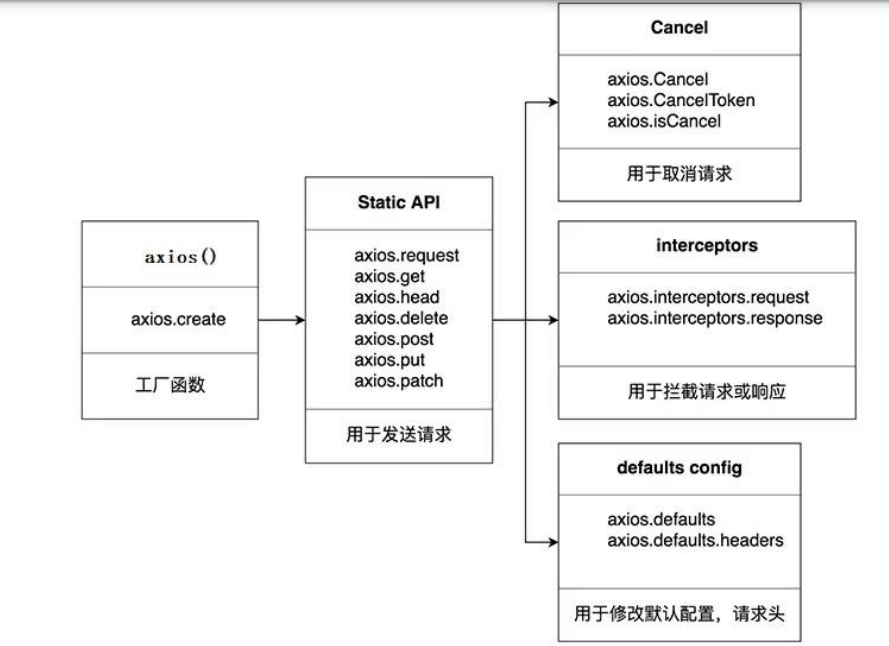
四、axios源码分析
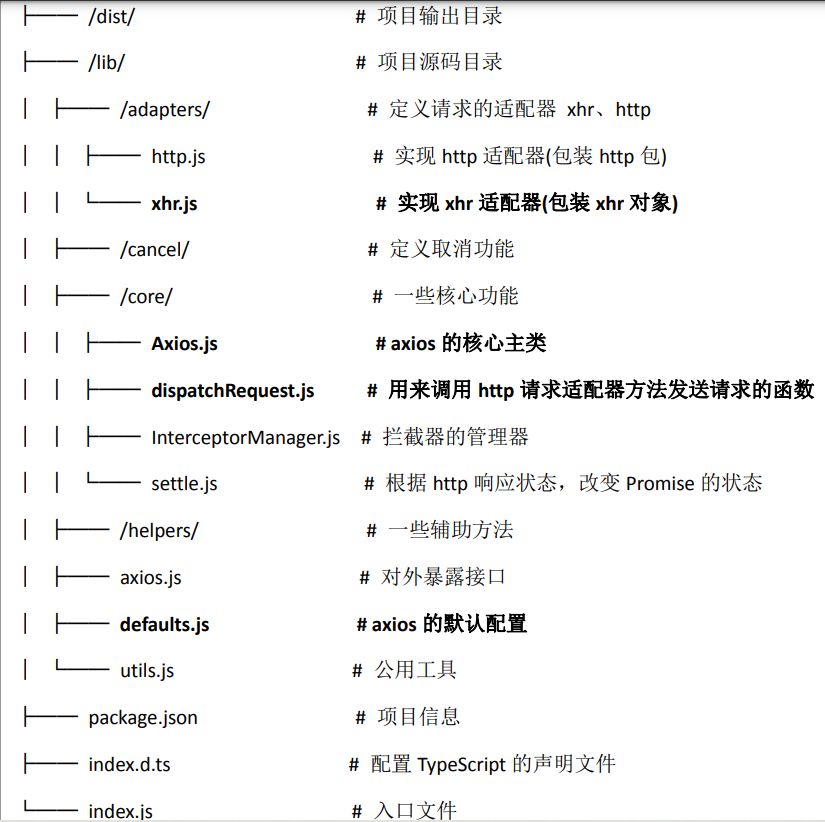
4.1 . 源码目录结构